Tu, 10.11.2026 | Original article from: Mass Spec Interpretation Services/James Little
Learn how to search low-resolution LC-MS/MS spectra in NIST26, select suitable libraries and search modes, interpret match scores, and avoid common import pitfalls.Searching Low-Resolution Spectra and Low-Resolution Libraries in NIST26
- Photo: Mass Spec Interpretation Services/James Little: Searching Low-Resolution Spectra and Low-Resolution Libraries in NIST26
- Video: Mass Spec Interpretation Services/James Little: Searching Low-Resolution Spectra and Low-Resolution Libraries in NIST26
Accurate-mass instruments are powerful tools for compound identification, but they are not the only way to benefit from modern tandem mass spectral libraries. NIST26 also provides useful search options for nominal-mass MS/MS data, extending library-assisted identification to laboratories using single-quadrupole and triple-quadrupole LC-MS systems. The key is selecting the right libraries, search algorithms, and import settings.
Why low-resolution MS/MS library searching matters
Many laboratories generate fragmentation spectra using triple-quadrupole mass spectrometers with collision cells or single-quadrupole systems capable of in-source collision-induced dissociation (CID). Although these spectra lack the accurate-mass information produced by high-resolution mass spectrometry (HRMS), their fragment-ion patterns can still provide valuable evidence for identifying compounds.
When the target compound is represented in a reference library and the fragmentation conditions are sufficiently comparable, nominal-mass spectra can produce meaningful matches. This opens up opportunities to investigate unknowns using instrumentation already available in routine analytical laboratories.
Accurate mass remains an important additional source of selectivity and confidence, particularly for distinguishing compounds with similar fragmentation patterns.
Which spectral libraries can be searched?
NIST26 can be configured to search several types of reference data, including:
- NIST high-resolution MS/MS libraries:
hr_msms_nistandapci_msms, which contain accurate-mass spectral information. - NIST low-resolution MS/MS library:
lr_msms_nist, which includes special indexing that allows its entries to be retrieved in certain accurate-mass MS/MS search modes as well as nominal-mass searches. - Publicly available collections: MoNA (
mona_lcmsms) and MS-DIAL libraries, which predominantly contain accurate-mass spectra but also include some nominal-mass data. - User-created libraries: Personal collections of low-resolution MS/MS spectra acquired and curated within a laboratory.
For broad searches, a combination of appropriate libraries may be selected. However, the search mode determines which entries are actually considered, even when several libraries are enabled.
Choosing the appropriate NIST26 search mode
One of the most useful aspects of NIST26 is that low-resolution MS/MS spectra can be searched using algorithms whose names refer to electron ionization (EI). Despite the terminology, these functions can compare nominal-mass fragmentation patterns obtained by LC-MS/MS.
Identity → EI Normal
This is a practical starting point for low-resolution MS/MS identification.
The algorithm gives relatively greater importance to higher-m/z fragment ions, which may be particularly useful for structural discrimination.
Similarity → Simple EI
This mode provides a more balanced comparison of observed peaks without the same emphasis on higher-mass ions.
It can be useful when assessing the overall similarity between experimental and reference fragmentation patterns.
Similarity → MS/MS EI
This function performs a different task: it compares an MS/MS query with EI reference spectra. It is not simply another way to search an MS/MS library.
How does this differ from an MS/MS identity search?
Identity → MS/MS and HiRes NoPrecursor primarily operate on accurate-mass library information.
They do not generally include ordinary low-resolution user libraries; the specially indexed NIST lr_msms_nist library is an important exception.
Consequently, an apparently unsuccessful MS/MS search does not necessarily mean that a low-resolution reference spectrum is unavailable.
Repeating the search with EI Normal or Simple EI may reveal additional candidates.
For users switching frequently between search types, setting the spectrum type to Any keeps the relevant EI and MS/MS functions available in the interface.
Importing and searching experimental spectra
The search begins with transferring an experimental product-ion spectrum to the NIST Spec List.
In the demonstrated workflow, spectra acquired in Agilent MassHunter are transferred using the Send NIST Lib function. Depending on the data system, an equivalent integration or export to a supported text or MSP format may be used.
Correct import settings are essential:
- For nominal-mass data, select EI (normal m/z) in the spectrum import options.
- For accurate-mass data, select Accurate m/z and retain the appropriate number of decimal places.
- Choose the relevant libraries and search mode before running the search.
- Review the hit list alongside the experimental and reference spectra, rather than relying only on the highest-ranked result.
Frequently used options can be retained through File → Save Configuration, making the workflow more reproducible for routine analysis.
Understanding match scores and alternative rankings
A library hit list offers several ways to assess spectral agreement. Different metrics respond differently to noise, incomplete fragmentation, and extra ions in an experimental spectrum.
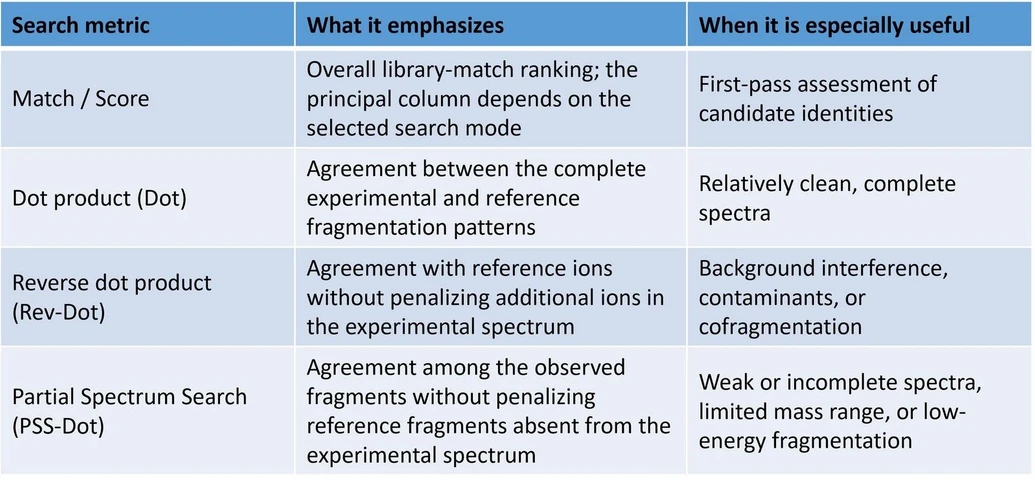 LabRulez / Mass Spec Interpretation Services/James Little: Understanding match scores and alternative rankings
Additional columns, such as MW, R. Match, and PSS Match, can be enabled through the hit-list properties.
Molecular weight is particularly helpful when checking whether the proposed neutral molecule is consistent with the selected precursor ion, including common adducts such as [M+H]⁺.
Why sorting results is not the same as running a new search
There is an important distinction between sorting an existing list by a different metric and running a new search optimized for that metric.
An initial full-spectrum presearch may already have excluded some candidates.
For difficult samples, a dedicated reverse-match or partial-spectrum search can therefore be more informative than simply reordering the original results.
This distinction is particularly relevant when experimental spectra contain substantial noise, interfering ions, or only a limited number of informative fragments.
A practical example: identifying trazodone
An illustrative nominal-mass MS/MS search uses a spectrum of trazodone, with a protonated precursor near m/z 372.
The EI-based identity search retrieves reference spectra that can be assessed through both the hit rankings and a direct comparison of fragment peaks.
The compound's nominal neutral molecular mass, approximately 371, provides an additional plausibility check against the precursor ion.
Managing duplicate library entries
The Best Matching Only setting offers another way to simplify the results.
It can group repeated entries for the same structure using their InChIKeys, reducing a long list of spectra to fewer distinct compound candidates.
However, switching it off allows the analyst to inspect multiple reference spectra individually, which may be valuable when collision energies and relative ion abundances differ.
As with any library search, a plausible match should be evaluated against:
- Precursor ion selection and molecular mass
- Agreement between experimental and reference fragment ions
- Relative fragment-ion intensities
- Sample composition and analytical context
- Additional analytical evidence, where available
A high library-match score is valuable evidence, but it should not be treated as definitive structural confirmation on its own.
Import and display details worth checking
Two software behaviors observed in the NIST26 demonstration underline the value of verifying imported data before interpreting search results.
Intensity threshold and accurate-mass precision
Applying an Intensity Threshold within the spectrum import options caused spectra transferred from vendor software to be represented at nominal mass, even when accurate-mass precision had been specified.
Users working with HRMS data should therefore check that imported m/z values retain the expected decimal precision and validate any intensity-filtering settings in their own installation.
Truncated mass values in the Chromatogram window
The Chromatogram window displayed some accurate-mass ions with truncated decimal places after low-resolution import settings had been applied.
In the demonstrated case, this was a display issue affecting the upper spectrum comparison, not the underlying accurate-mass deconvolution or library-search results.
These observations should be treated as version- and workflow-specific checks, rather than assumptions about every NIST26 installation.
Conclusion
Low-resolution MS/MS data can support effective reference-library searching when the compound is represented and the search is configured appropriately.
NIST26 provides several complementary strategies, with Identity EI Normal and Similarity Simple EI offering particularly useful routes into nominal-mass MS/MS libraries.
Careful import settings, inspection of reference spectra, and informed use of Dot, Rev-Dot, and PSS-Dot scores can improve the quality of candidate assessment—without requiring accurate-mass instrumentation for every initial identification task.