Tu, 27.10.2026 | Original article from: Mass Spec Interpretation Services/James Little
Learn how to send MS/MS spectra directly from Agilent, Waters, Thermo, and other vendor software to NIST26 for fast library searching without full chromatogram processing.Sending MS/MS (Tandem) Spectra to NIST26 Search
- Photo: Mass Spec Interpretation Services/James Little: Sending MS/MS (Tandem) Spectra to NIST26 Search
- Video: Mass Spec Interpretation Services/James Little: Sending MS/MS (Tandem) Spectra to NIST26 Search
NIST26 includes integrated processing tools for LC-MS/MS data, but there are situations where working directly from instrument vendor software can be faster and more practical. When only a few peaks need to be evaluated, when mzML conversion is inconvenient, or when nominal-mass data are involved, spectra can be transferred directly into NIST Library Search for identification. This workflow can streamline spectral searching while still providing access to NIST high-resolution and low-resolution libraries, public MS/MS resources, and flexible search settings.
When does direct transfer from vendor software make sense?
NIST26 provides integrated data processing in the Chromatogram tab, including workflows for deconvolution and library searching. In many cases, this is the most comprehensive way to process LC-MS/MS datasets.
However, chromatogram-based processing generally requires conversion of the original vendor data into mzML, for example using ProteoWizard/MSConvert. If a chromatogram is relatively simple, deconvolution is unnecessary, and only a small number of peaks need to be investigated, converting and processing the entire file may add unnecessary steps.
In these situations, it can be more efficient to select an MS/MS spectrum directly in the original vendor software and send it to NIST Library Search.
There are also other cases where direct transfer becomes particularly useful. Some proprietary data formats may not convert cleanly into mzML, while nominal-mass MS/MS data are not supported for MS/MS searching in the NIST26 Chromatogram tab. For this type of data, transferring or importing spectra into Library Search becomes the practical alternative.
Which vendor software can send spectra directly to NIST?
Several major instrument platforms provide direct integration with NIST Library Search.
The workflow is available with software from:
- Agilent, including MassHunter and OpenLab,
- Waters,
- Thermo Fisher Scientific.
Wiley KnowItAll can also import spectra into NIST Search and supports numerous vendor data formats through its own software environment.
For some other platforms, direct NIST integration may not be available. In those situations, spectra can potentially be exported in text-based formats such as TXT or MSP ASCII and then imported into the Spectrum List in NIST Library Search.
Direct transfer is generally more convenient because it avoids intermediate export and import steps.
A practical Agilent example
The workflow can be demonstrated using Agilent software.
An analyst first selects the desired MS/MS region, averages the spectrum if necessary, and transfers it into the spectrum display. From there, the spectrum can be sent to NIST using the Search Using NIST MS Program command.
Once properly configured, NIST automatically receives the spectrum and initiates the specified search. Before relying on this workflow, however, the import and library search parameters should be checked carefully.
Setting up accurate-mass spectrum import
For high-resolution MS/MS data, the first important step is found under Spectrum Import Options.
Accurate-mass spectra should be imported with the appropriate number of decimal places for precursor and product ions, and the Accurate m/z spectrum type must be selected.
Preserving mass accuracy is essential because one of the main advantages of HRMS library searching is the ability to distinguish candidates using precise precursor and fragment masses.
Once the import settings are correct, the next step is configuring the library-search parameters.
Searching without a precursor ion
Depending on how the spectrum is selected or averaged in the vendor software, precursor information may not always be transferred automatically.
NIST26 can still search such a spectrum using HiRes NoPrecursor mode.
Alternatively, if the precursor m/z is known, it can be entered manually and the search can then include precursor information.
The no-precursor approach can be convenient when quickly screening manually selected MS/MS spectra, particularly when the fragment pattern itself contains enough information to generate useful candidate matches.
Setting mass tolerances
For accurate-mass MS/MS searching, suitable precursor and product-ion tolerances are essential.
An example configuration uses:
- 20 ppm for the precursor ion
- 40 ppm for product ions
These settings can be kept consistent with those used in the NIST26 Chromatogram workflow.
Proper tolerance settings help balance search sensitivity with selectivity. If tolerances are too wide, more irrelevant candidates may be returned; if they are too narrow, valid matches can be missed because of normal measurement variation.
Combining multiple spectral libraries
One of the strengths of NIST Search is the ability to search multiple libraries simultaneously.
A typical configuration can include the NIST high-resolution MS/MS library together with the NIST low-resolution tandem library.
The NIST low-resolution library can participate in accurate-mass workflows because it contains the required indexing information. This is important because not every custom or older low-resolution library will necessarily be compatible with the same type of high-resolution search.
Additional public resources can also be included, such as:
- MS-DIAL positive-mode libraries
- MS-DIAL negative-mode libraries
- MoNA LC-MS/MS
Combining commercial and public libraries can substantially broaden spectral coverage. In the demonstrated workflow, several million spectra could be searched in a single configuration.
For laboratories dealing with unusual metabolites, impurities, environmental contaminants, or compounds outside mainstream commercial libraries, this expanded search space can be particularly valuable.
Structure searches require separate library selection
MS/MS searching and structure searching do not necessarily use the same library selections.
If structural searching is required, the appropriate structure-containing libraries must also be loaded in the corresponding Library Search settings.
This distinction is easy to overlook when first configuring NIST26. A library may contain useful spectra but no associated structures, or the structure database may need to be explicitly selected before substructure or related structural searches can be performed.
Automating the search
Once the library and tolerance settings have been defined, Automatic Search can be enabled.
This allows the spectrum transferred from vendor software to trigger a search immediately rather than requiring the user to launch it manually each time.
For repeated workflows involving many manually selected peaks, this small automation can save considerable time.
After the configuration has been optimized, it is useful to save it as a dedicated setup—for example, a configuration specifically designed for vendor-imported spectra.
Understanding the result table
NIST search results are typically ranked by score, but additional parameters can also help interpret the matches.
Fields can include:
- score,
- reverse score,
- partial spectrum search score,
- dot product,
- molecular weight,
- other user-selected parameters.
The search result display can be customized by right-clicking the column headers and adding or removing fields.
Although the standard score will usually remain the primary ranking criterion, alternative metrics can be useful when evaluating spectra with missing fragments, additional peaks, partial spectral overlap, or related structures.
Why it can be useful to keep duplicate matches visible
NIST includes a Best Matching Only option that reduces duplicate or repeated entries in the displayed results.
When enabled, the software may reduce a list containing several library records of the same compound to the best representative match.
This makes the result list easier to review, but it can also hide useful information.
For initial evaluation, it is often preferable to leave this option disabled so that all matching spectra remain visible. Multiple spectra of the same compound may come from different collision energies, instruments, ion forms, or libraries, and reviewing these variations can provide useful confirmation.
Filters can always be applied later once the analyst understands the full result set.
Visual comparison of unknown and library spectra
NIST Library Search provides several complementary views of each candidate.
The experimentally acquired unknown spectrum is displayed together with the selected library spectrum, while a head-to-head spectral comparison provides an immediate visual representation of matching and non-matching ions.
This is important because library-search scores should not be treated as a fully automated identification decision.
A strong match should still be examined visually, especially when dealing with complex spectra, low-abundance fragments, co-isolated ions, or compounds with closely related structural analogues.
The combination of numerical scoring and visual inspection provides a stronger basis for interpretation.
An important issue with the Intensity Threshold setting
One practical software issue deserves particular attention when importing high-resolution spectra.
The Spectrum Import Options window includes an Intensity Threshold function that can remove low-intensity signals and reduce spectral noise.
In principle, this would be useful. However, when an intensity threshold is applied, imported high-resolution spectra may lose their decimal mass information and be transferred as nominal-mass spectra instead.
An accurate-mass peak such as 176.0815 could therefore appear simply as m/z 176.
For HRMS users, this effectively removes one of the most important dimensions of the data and can compromise accurate-mass searching.
Until this behavior is corrected, the safer approach is to avoid using the Intensity Threshold option during high-resolution spectrum import and perform any necessary filtering elsewhere.
A related display issue in the Chromatogram window
A second software behavior concerns how Spectrum Import Options are reflected in the Chromatogram tab.
If the decimal precision is set to zero for importing low-resolution spectra, the head-to-head spectral display may subsequently show masses truncated according to those settings.
Importantly, this is a display issue only.
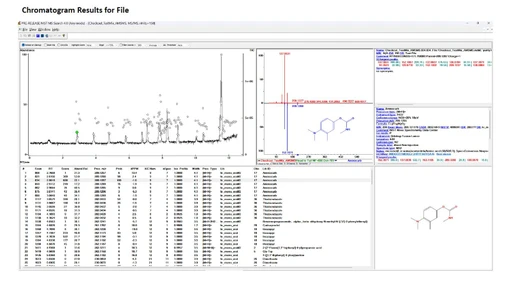
It does not change the accurate-mass deconvolution results or the library-search table. The underlying processed data remain unaffected; only the visual comparison at the top of the Chromatogram window reflects the altered import settings.
Understanding this distinction can prevent users from mistakenly assuming that accurate-mass data have been lost from the processed results.
When direct vendor-to-NIST searching is most useful
Direct transfer from vendor software is not intended to replace the complete NIST26 Chromatogram workflow.
Instead, it provides a complementary route for situations where full chromatographic processing is unnecessary or unavailable.
It can be particularly effective when:
- only a few peaks need identification,
- deconvolution is not required,
- mzML conversion adds unnecessary processing,
- vendor files cannot be converted reliably,
- nominal-mass MS/MS spectra need to be searched,
- spectra have already been reviewed and selected in the vendor environment.
For these cases, direct spectrum transfer offers a fast route from the original MS/MS data to spectral library identification.
Connecting vendor software with broader NIST26 capabilities
The workflow also illustrates a broader advantage of NIST26: analysts do not have to choose between the instrument vendor's software and an independent spectral-search environment.
Vendor software can remain the primary platform for inspecting chromatograms and selecting spectra, while NIST provides access to large commercial libraries, public MS/MS databases, flexible scoring, spectral comparison, and additional interpretation tools.
Used together, these environments can provide a practical workflow for both rapid routine searching and more detailed unknown identification.
The key is careful configuration. Accurate-mass import settings, mass tolerances, library selection, search mode, and result-display options all influence how effectively the workflow performs.
Once these parameters are properly established and saved, sending a spectrum from the vendor software to NIST26 can become a rapid and repeatable part of everyday LC-MS/MS data interpretation.