Tu, 6.10.2026 | Original article from: Mass Spec Interpretation Services/James Little
Explore the free NIST26 demo for integrated LC-MS/MS processing, including MS/MS deconvolution, library searching, test files, and support for NIST, MoNA, and MS-DIAL libraries.NIST26 FREE Demonstration (Demo) Copy of MS/MS Integrated Processing
- Photo: Mass Spec Interpretation Services/James Little: NIST26 FREE Demonstration (Demo) Copy of MS/MS Integrated Processing
- Video: Mass Spec Interpretation Services/James Little: NIST26 FREE Demonstration (Demo) Copy of MS/MS Integrated Processing
The new NIST26 release introduces integrated processing for tandem mass spectrometry, combining MS/MS deconvolution with library searching in a single workflow. To help users explore the functionality before working with the full NIST26 library, a free demonstration version provides a compact but fully functional environment with example data, a small NIST demo library, and support for additional public spectral libraries. In a recent handout, James Little of Mass Spec Interpretation Services outlined what is included in the demo, how the files should be organized, and how the available libraries can be used for testing the new LC-MS/MS processing workflow. demo-library-handout
A fully functional demonstration of the new NIST26 workflow
The NIST26 demo is designed to showcase the software’s new integrated deconvolution and library-searching capabilities for MS/MS data. According to the handout, the demonstration copy is fully functional and is intended to allow users to explore the new workflow using supplied test files and spectral libraries. The software is accompanied by installation guidance and a video demonstration. demo-library-handout
The demo package includes a small NIST library containing 26 compounds and 830 associated MS/MS spectra. Two test files containing these compounds are provided in positive- and negative-ion modes, giving users a ready-made dataset for evaluating the workflow. demo-library-handout
Additional mzML test files representing commonly available compounds can also be added, allowing the demonstration environment to be used with a broader range of example data.
Extending the demo with public MS/MS libraries
One of the useful aspects of the setup is that it is not limited to the small NIST demonstration library.
The handout describes three additional public libraries that can be installed alongside the demo data. These are derived from MassBank of North America (MoNA) and MS-DIAL resources and collectively contain more than 520,000 MS/MS spectra and over 150,000 associated structures, according to the estimates presented in the material. demo-library-handout
James Little emphasizes, however, that these public resources should not be considered equivalent to the full NIST MS/MS library in terms of either spectral quantity or quality. Their value lies partly in extending compound coverage, because they may include substances absent from NIST26. For that reason, the recommendation in the handout is to search multiple available libraries rather than relying on only one source. demo-library-handout
How does the full NIST26 library compare?
The presentation also provides a broad comparison of the different spectral resources.
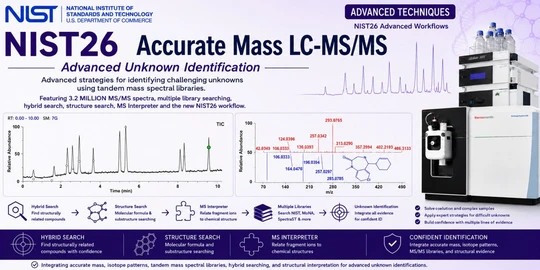
The NIST 2026 Tandem MS/MS library is listed as containing approximately 68,635 unique compounds and around 3.2 million MS/MS spectra, with structures available for all 68,635 entries. It is described as a fully curated and structure-linked resource. demo-library-handout
For comparison, the handout gives approximate figures of 30,000–50,000 unique compounds and more than 150,000 spectra for MoNA LC-MS/MS, with approximately 50,000 structures available when imported together with the associated SDF file.
The MS-DIAL V19 MSP libraries are estimated to contain approximately 30,000–100,000 unique compounds and around 365,000 spectra. By default, however, the MSP entries are spectral records without corresponding structures unless those structures are provided separately. demo-library-handout
The presentation explicitly labels these figures as very approximate estimates derived from ChatGPT, Grok, and other sources, so they should be interpreted as orientation rather than authoritative library specifications. demo-library-handout
Why search more than one library?
Spectral-library searching is fundamentally dependent on whether a relevant reference spectrum exists in the selected database.
A high-quality curated library provides strong confidence when the analyte is represented, but no single library necessarily contains every compound encountered in an LC-MS/MS experiment. Supplementing the NIST resources with public libraries can therefore widen the searchable chemical space.
In the workflow proposed in the handout, the smaller demo library provides a controlled environment for learning the software, while the public MoNA and MS-DIAL resources demonstrate how additional libraries can be incorporated into the same search environment.
This allows users to become familiar not only with the mechanics of NIST26 processing, but also with a more realistic multi-library strategy in which complementary spectral collections may contribute different candidate identifications.
Installing the demonstration environment
The setup described in the handout is intentionally straightforward.
Users first download the NIST demo software and work with the test files and demonstration library supplied with the installation. Additional public libraries and mzML test files can then be placed into the appropriate folders used by the demo environment. demo-library-handout
The folder structure shown in the presentation contains separate locations for the three public libraries:
- mona_lcmsms
- ms_dial_neg_v19
- ms_dial_pos_v19
The small NIST demonstration library is stored separately in the demo-lib folder. This organization allows the software to access the individual library resources during searching while keeping the NIST demo library distinct from the external collections.
The screenshot on page 5 of the handout illustrates the required placement of these library folders within the NIST26 demonstration directory. demo-library-handout
Working with the supplied test files
The demo also provides a dedicated TestFiles directory.
According to the handout, the first two mzML files in this folder are the NIST demonstration datasets. Three additional example mzML files from the Mass Spec Interpretation Services website can be added to the same location to provide further material for testing the processing and library-searching workflow. demo-library-handout
This makes it possible to move gradually from a tightly controlled NIST dataset to somewhat broader test cases while remaining within the same software environment.
For users encountering integrated MS/MS processing for the first time, that progression can be particularly useful: the demonstration data establish that the installation and search configuration are working correctly before more complex files or external datasets are introduced.
A practical entry point to integrated MS/MS processing
The value of the NIST26 demo lies less in the size of its built-in library than in providing a working environment for understanding the new integrated workflow.
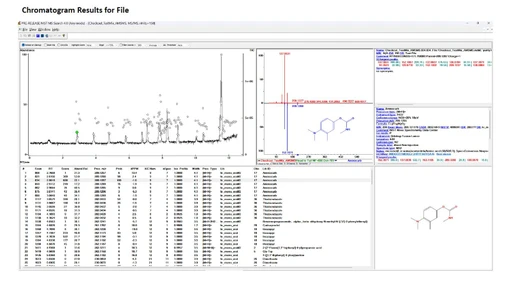
Users can install the software, process known datasets, search the supplied NIST demo library, add external public libraries, and observe how the same files behave when searched against different spectral resources.
The approach also highlights an important aspect of modern LC-MS/MS identification: spectral-library searching is not necessarily restricted to a single database. Curated resources such as NIST and broad public collections such as MoNA or MS-DIAL can provide complementary coverage, although their quality, annotation, structural information, and degree of curation differ substantially.
For laboratories preparing to use the full NIST26 tandem MS/MS library, the free demonstration version therefore offers a practical way to become familiar with the software architecture, file organization, test datasets, and multi-library searching strategy before moving to larger routine datasets.