Take Control of Your Data: An Introduction to the Scripting Node in Compound Discoverer Software

Tu, 4.11.2025 | Original article from: Thermo Fisher Scientific / Zoe Julian
Discover how the scripting node in Thermo Scientific Compound Discoverer lets you run custom R or Python code directly in your workflow for tailored calculations, database links, and advanced data insights.
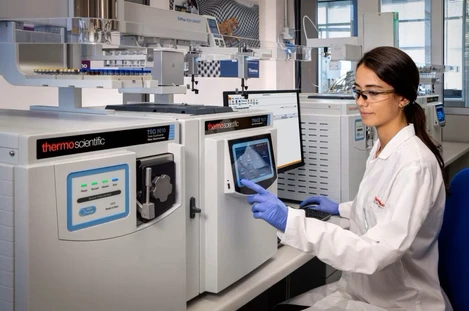
  • Photo: Thermo Fisher Scientific: Take Control of Your Data: An Introduction to the Scripting Node in Compound Discoverer Software
  • Video: Chromatography & Mass Spectrometry Solutions: Compound Discoverer for the Analysis and Reporting of PFAS
     

In small molecule research, your data is only as powerful as the workflows behind it. Thermo Scientific Compound Discoverer software is already trusted for its robust, automated data analysis — but what if you need to go beyond the built-in functionality?

One question we often hear is:

How can I easily customize Compound Discoverer software to allow for my own calculations and other functionalities?

That’s where the scripting node comes in.

Thermo Fisher Scientific: Take Control of Your Data - An Introduction to the Scripting Node in Compound Discoverer SoftwareThermo Fisher Scientific: Take Control of Your Data - An Introduction to the Scripting Node in Compound Discoverer Software

What is the scripting node?

Think of the scripting node as a flexible add-on inside your Compound Discoverer workflow. It lets you run your own custom code (like an R or Python script) during data processing — so you can calculate, filter, or annotate your results exactly how you need.

Instead of manually exporting results to edit elsewhere, you can:

  • Export a table (e.g., the compounds table) directly from Compound Discoverer software.
  • Run your script to calculate new values or modify existing ones.
  • Return the updated data straight back into your workflow for visualization, filtering, or reporting.

No complex programming knowledge needed — just your script and a clear idea of what you want to customize.

Why use the scripting node?

Compound Discoverer software already supports a wide range of built-in processing and annotation tasks — but every lab has unique questions, data formats, and downstream needs. With the scripting node you can:

  • Calculate custom ratios like O/C and H/C for elemental analysis.
  • Add logP values by integrating tools like OpenBabel*.
  • Connect to your own in-house databases or pathway tools like BioCyc**.
  • Automatically flag expected or unexpected compounds with custom logic.
  • Perform extra data checks, visualizations, or export formats unique to your project.

In short, the scripting node helps you extend the power of Compound Discoverer software to fit your exact goals, saving time and manual effort.

See it in action

Curious how it works in practice? Our step-by-step on-demand webinar, “Customizing Compound Discoverer: How to Create a Scripting Node Using R,” walks you through it all.

You’ll learn:
  • How to create a simple scripting node from scratch.
  • Real examples of popular use cases, from simple column calculations to PFAS and pathway exports.
  • Common pitfalls and best practices to help you get started smoothly.

Whether you’re just getting started with scripting or you’re looking for inspiration for your own projects, it’s the perfect way to see what’s possible.

Watch the webinar recording here and discover how easy it is to customize your workflows.

Take a look at some of our recent application notes that utilize scripting nodes:

Visit us on LinkedIn: #CompoundDiscoverer #SmallMolecules #Software #Scripting node

Zoe Julian is a Product Marketing Manager for Chromatography and Mass Spectrometry software at Thermo Fisher Scientific. With over 12 years' experience of working with chromatography and mass spectrometry techniques with a background in GC and GC-MS(/MS) organic environmental analysis, she has helped many laboratories and industries improve their workflows through a unique understanding of their challenges. Transitioning to a focus on Chromeleon CDS she has shown customers how software solutions can improve their productivity and support their day-to-day operations.

Resources

*https://github.com/openbabel/openbabel

**BioCyc Database Collection is managed by SRI International.

Thermo Fisher Scientific
LinkedIn Logo
 

Related articles

Chromeleon CDS: Hints and Tips to Help Optimize your GC-MS Workflows
Article | Software

Chromeleon CDS: Hints and Tips to Help Optimize your GC-MS Workflows

Streamline your GC-MS workflows with Chromeleon CDS—automated retention time alignment, smart diagnostics, and audit-ready reporting help you save time and reduce errors.
Why Compound Discoverer 3.4 Software is Worth Your Attention!
Article | Product

Why Compound Discoverer 3.4 Software is Worth Your Attention!

Discover Thermo Scientific Compound Discoverer 3.4 – faster processing, improved compound ID, integrated LipidSearch, new QC tools, molecular networking, and Ardia platform support.
Leveraging Local Libraries for Positively Parsimonious Peak Tables (James Harynuk, MDCW 2026)
Presentation | Video

Leveraging Local Libraries for Positively Parsimonious Peak Tables (James Harynuk, MDCW 2026)

Discover how custom MS libraries and retention index filtering improve GC×GC–MS peak identification, alignment, and data quality in complex samples.
From Complexity to Clarity: Smarter PFAS Identification Workflows in Compound Discoverer Software
Article | Product

From Complexity to Clarity: Smarter PFAS Identification Workflows in Compound Discoverer Software

Non-targeted PFAS analysis using Orbitrap HRAM and Compound Discoverer 3.5 enables confident identification of thousands of PFAS through advanced libraries, scoring tools and visualization workflows.
 

Related articles

Chromeleon CDS: Hints and Tips to Help Optimize your GC-MS Workflows
Article | Software

Chromeleon CDS: Hints and Tips to Help Optimize your GC-MS Workflows

Streamline your GC-MS workflows with Chromeleon CDS—automated retention time alignment, smart diagnostics, and audit-ready reporting help you save time and reduce errors.
Why Compound Discoverer 3.4 Software is Worth Your Attention!
Article | Product

Why Compound Discoverer 3.4 Software is Worth Your Attention!

Discover Thermo Scientific Compound Discoverer 3.4 – faster processing, improved compound ID, integrated LipidSearch, new QC tools, molecular networking, and Ardia platform support.
Leveraging Local Libraries for Positively Parsimonious Peak Tables (James Harynuk, MDCW 2026)
Presentation | Video

Leveraging Local Libraries for Positively Parsimonious Peak Tables (James Harynuk, MDCW 2026)

Discover how custom MS libraries and retention index filtering improve GC×GC–MS peak identification, alignment, and data quality in complex samples.
From Complexity to Clarity: Smarter PFAS Identification Workflows in Compound Discoverer Software
Article | Product

From Complexity to Clarity: Smarter PFAS Identification Workflows in Compound Discoverer Software

Non-targeted PFAS analysis using Orbitrap HRAM and Compound Discoverer 3.5 enables confident identification of thousands of PFAS through advanced libraries, scoring tools and visualization workflows.
 

Related articles

Chromeleon CDS: Hints and Tips to Help Optimize your GC-MS Workflows
Article | Software

Chromeleon CDS: Hints and Tips to Help Optimize your GC-MS Workflows

Streamline your GC-MS workflows with Chromeleon CDS—automated retention time alignment, smart diagnostics, and audit-ready reporting help you save time and reduce errors.
Why Compound Discoverer 3.4 Software is Worth Your Attention!
Article | Product

Why Compound Discoverer 3.4 Software is Worth Your Attention!

Discover Thermo Scientific Compound Discoverer 3.4 – faster processing, improved compound ID, integrated LipidSearch, new QC tools, molecular networking, and Ardia platform support.
Leveraging Local Libraries for Positively Parsimonious Peak Tables (James Harynuk, MDCW 2026)
Presentation | Video

Leveraging Local Libraries for Positively Parsimonious Peak Tables (James Harynuk, MDCW 2026)

Discover how custom MS libraries and retention index filtering improve GC×GC–MS peak identification, alignment, and data quality in complex samples.
From Complexity to Clarity: Smarter PFAS Identification Workflows in Compound Discoverer Software
Article | Product

From Complexity to Clarity: Smarter PFAS Identification Workflows in Compound Discoverer Software

Non-targeted PFAS analysis using Orbitrap HRAM and Compound Discoverer 3.5 enables confident identification of thousands of PFAS through advanced libraries, scoring tools and visualization workflows.
 

Related articles

Chromeleon CDS: Hints and Tips to Help Optimize your GC-MS Workflows
Article | Software

Chromeleon CDS: Hints and Tips to Help Optimize your GC-MS Workflows

Streamline your GC-MS workflows with Chromeleon CDS—automated retention time alignment, smart diagnostics, and audit-ready reporting help you save time and reduce errors.
Why Compound Discoverer 3.4 Software is Worth Your Attention!
Article | Product

Why Compound Discoverer 3.4 Software is Worth Your Attention!

Discover Thermo Scientific Compound Discoverer 3.4 – faster processing, improved compound ID, integrated LipidSearch, new QC tools, molecular networking, and Ardia platform support.
Leveraging Local Libraries for Positively Parsimonious Peak Tables (James Harynuk, MDCW 2026)
Presentation | Video

Leveraging Local Libraries for Positively Parsimonious Peak Tables (James Harynuk, MDCW 2026)

Discover how custom MS libraries and retention index filtering improve GC×GC–MS peak identification, alignment, and data quality in complex samples.
From Complexity to Clarity: Smarter PFAS Identification Workflows in Compound Discoverer Software
Article | Product

From Complexity to Clarity: Smarter PFAS Identification Workflows in Compound Discoverer Software

Non-targeted PFAS analysis using Orbitrap HRAM and Compound Discoverer 3.5 enables confident identification of thousands of PFAS through advanced libraries, scoring tools and visualization workflows.